Phantom is the best-known wallet for Solana and now also supports Ethereum, Base, Polygon and Bitcoin. Sooner or later many users run into the same problem: the phone is gone, the browser extension password is forgotten, the wallet suddenly shows zero after an import, or it is unclear how to cash out to a bank account. Based on the official Phantom help center, this guide explains how to regain access, why balances can go missing and how to secure your wallet properly.
Key points
- Phantom is self-custodial. Support cannot recover your recovery phrase, private key or PIN.
- How you get back in depends on how the wallet was created: with a 12-word phrase or with Google or Apple.
- An iCloud or Google Drive backup restores the app, but not access to the wallet.
- A zero balance after an import usually does not mean the coins are gone: often accounts, a network or an imported key are missing.
What is Phantom Wallet?
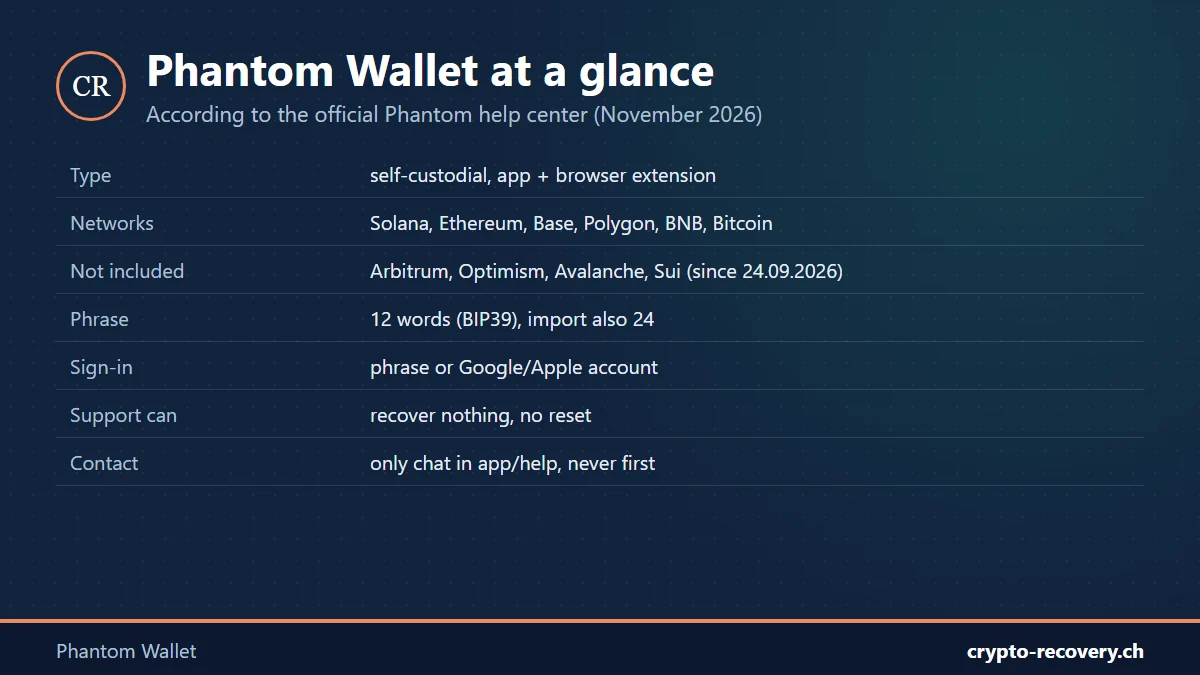
Phantom is a free, self-custodial wallet available as an app for iPhone and Android and as a browser extension. Self-custodial means your coins sit on the blockchain, and only whoever holds the credentials can move them. Phantom itself has no access.
According to the Phantom help center, the wallet currently supports Solana, Ethereum, Base, Polygon, BNB Chain, Bitcoin (Native SegWit and Taproot) and a few newer networks. Arbitrum, Optimism and Avalanche, among others, are not supported. Phantom ended support for Sui on September 24, 2026. Sui balances are not lost, they are just no longer visible in Phantom.
There are two ways to create a Phantom wallet:
- With a recovery phrase: Phantom generates 12 words based on the BIP39 standard. These words are the master key for all accounts in the wallet.
- With Google or Apple: you sign in with your Google or Apple account. These wallets also have a recovery phrase in the background that you can view and back up in the settings.
Recover a Phantom wallet: how to get back in
With the recovery phrase
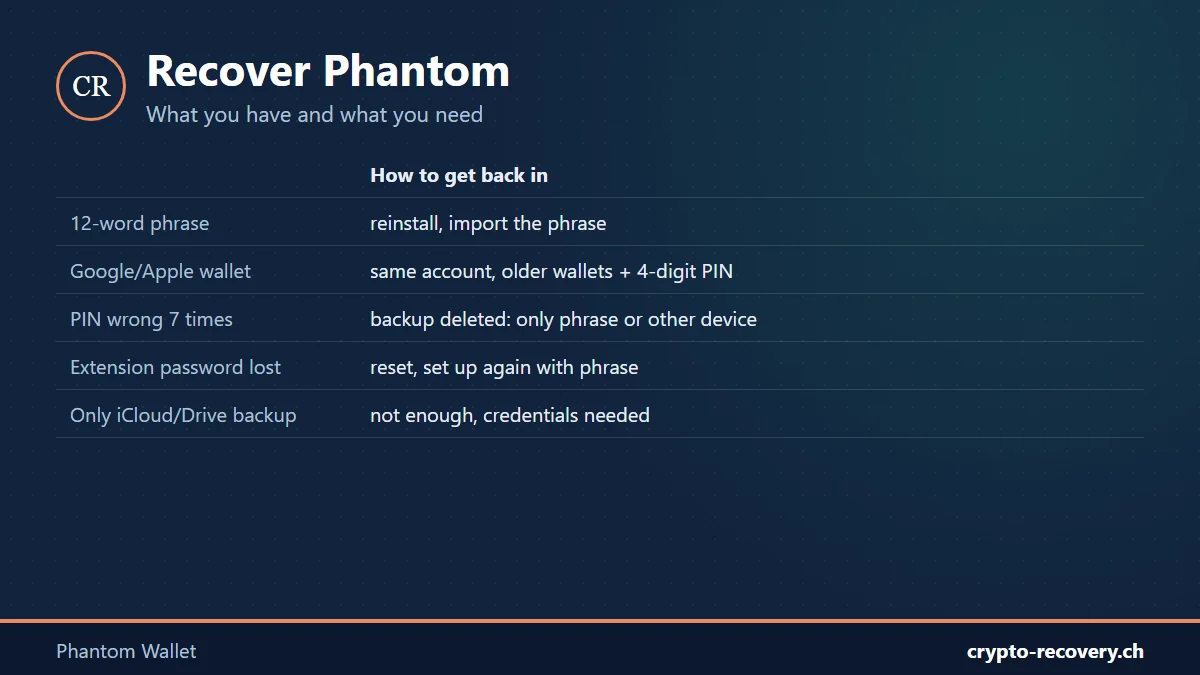
If you have your 12 words (24 for some imported wallets), reinstall Phantom, choose “I already have a wallet” and enter the words in the correct order. Phantom then automatically looks for accounts that have been used before. The phrase works on any device, even if the old phone is lost or broken.
Important: if you also imported private keys or other phrases into Phantom, your main phrase does not cover those accounts. Each imported account needs its own backup.
With Google or Apple
Wallets created with Google or Apple are reopened by signing in with exactly the same account. Older wallets also ask for a four-digit PIN. Phantom is currently moving these wallets to a new system (Phantom KMS) in which the PIN is dropped and only the Google or Apple account counts.
- Google and Apple are separate wallets. If you created the wallet with Google and sign in with Apple, you will see an empty wallet, even with the same email address.
- Forgot the PIN: after seven wrong attempts, Phantom deletes the encrypted backup on that device. Then only a previously exported recovery phrase or another device where you are still signed in can help.
- Lost the Google or Apple account: you need the exported phrase, or you first have to regain the Google or Apple account through the provider’s account recovery.
Our advice: even with a Google or Apple wallet, write down the recovery phrase once under Settings → Security & Privacy → “Show Recovery Phrase” and keep it offline. That way your funds do not depend on a single email account.
Forgot the browser extension password
The extension password only protects your browser; it is not the key to the wallet. According to Phantom, you reset it by choosing “Forgot password” → “Reset & wipe app” and then restoring the wallet. This only works if you have the phrase or the Google or Apple account. So only reset the extension once those credentials are safely at hand. If the phrase is not available, the old password can be valuable: see the guide forgot wallet password.
Phone backup in iCloud or Google Drive
A phone backup brings back the Phantom app, but not access to the wallet. Sometimes the wallet then only appears in watch-only mode. To send again, you need the original credentials: phrase, private key or Google or Apple account.
Phantom shows zero balance or accounts are missing
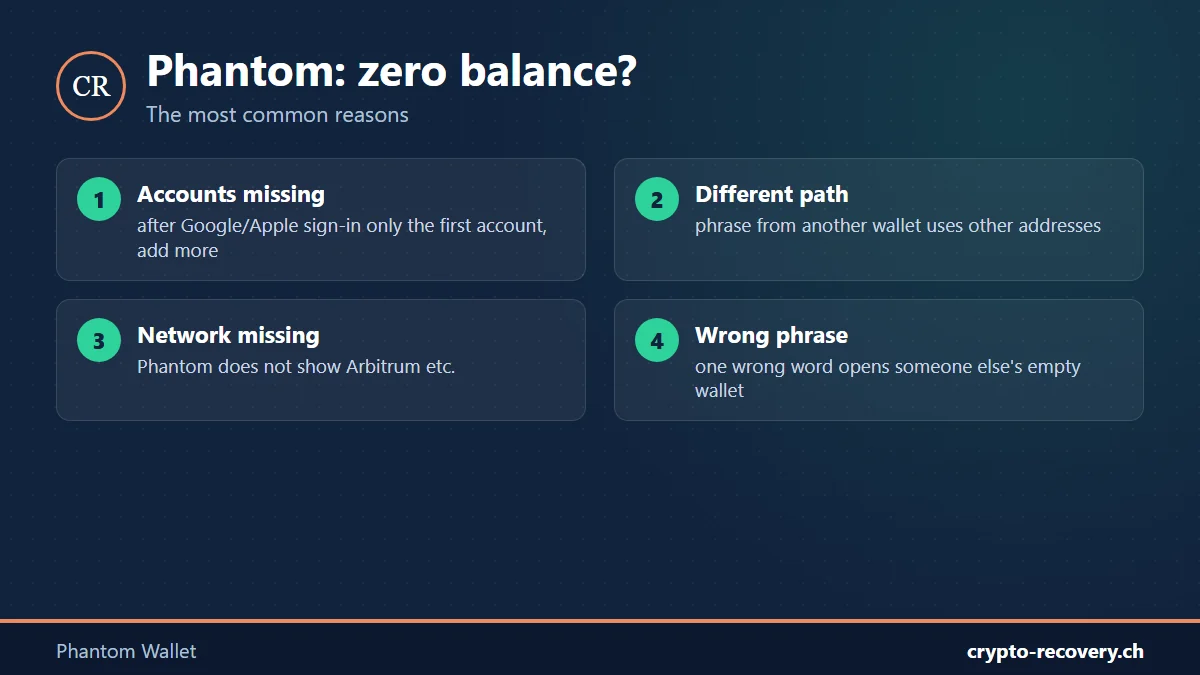
Is the wallet empty after an import or a new sign-in? Before assuming a loss, check these causes:
- Additional accounts missing: after signing in with Google or Apple, Phantom only restores the first account. You have to add further accounts yourself until all expected addresses appear.
- Different derivation path: if you created the phrase in another wallet, it may use different rules for the addresses. According to its own overview, Phantom supports several paths, but not all. Then different or empty addresses appear.
- Unsupported network: if tokens were sent to your Phantom address via Arbitrum or Optimism, for example, Phantom does not show them. According to Phantom, they can be reached with another EVM wallet that supports that network.
- Network turned off or token hidden: check the active networks in the settings. Phantom also automatically hides suspicious tokens as spam.
- Wrong phrase: every valid phrase opens a wallet. A swapped or wrong word can therefore open someone else’s empty wallet instead of showing an error.
To see whether an address holds anything, use a blockchain explorer such as solscan.io for Solana or etherscan.io for Ethereum, no login needed. Only ever enter the public address there, never words or keys.
Phantom does not accept the recovery phrase
Messages such as “Invalid secret recovery phrase” or “Word 1 is incorrect or misspelled” almost always point to a problem with the words. Check that there are exactly 12 or 24 words, that the order is right and that every word appears in the BIP39 word list. If a word is missing, misspelled or the order is unclear, the phrase can often be reconstructed: up to three missing or wrong words are frequently solvable. More in the guide seed phrase.
No access to your Phantom wallet? Incomplete phrase, words in the wrong order or tokens on the wrong network: I will check your case for free. You only pay on success, and your data usually stays with you. Request a free assessment
Cash out Phantom Wallet: getting money to your bank account
Phantom itself does not transfer money to your bank account. According to the Phantom help center, the usual route is:
- Get the deposit address for the token at an exchange and select the same network you will send on from Phantom.
- In Phantom, tap “Send”, paste the address and carefully check token, network and amount. You need some SOL (Solana) or ETH (Ethereum) for the fee.
- Sell for your local currency at the exchange and withdraw to your bank account, for example via OKX or Bybit.*
For larger amounts, send a small test amount first. If the exchange does not support the token or the network, the funds can be lost or only recovered with effort. What to do then is explained in the guide crypto sent on the wrong network. In the US and the EU, Phantom also offers its own Cash balance, with its own terms and an identity check.
* Affiliate link: if you sign up through it, I may receive a commission. Nothing changes for you. Not investment advice.
Fake support and drained wallets
Many scammers target Phantom users: fake apps, phishing sites, supposed airdrops and fake support on X, Discord or Telegram. According to Phantom:
- Support never contacts you first and never sends direct messages on social media.
- There is no phone number and no public email address. Help is only available through the chat in the app or on the help site, in English.
- Nobody from Phantom asks for your phrase, private key or PIN, or asks you to transfer funds.
If your wallet was drained, Phantom can neither reverse nor freeze transactions. Move any remaining coins to a new wallet immediately, stop connecting unknown apps and report it to the police. Be suspicious of anyone who promises to recover stolen coins for an upfront fee. That is technically not possible and usually the next scam. How to recognise such schemes is covered in the guide the 10 most common crypto scams.
For larger amounts, a hardware wallet is worth it, and Phantom supports them too. See the comparison best hardware wallet.
Frequently asked questions about Phantom Wallet
Can Phantom support recover my wallet?
No. Phantom is self-custodial and, according to its help center, cannot recover your recovery phrase, private key or PIN. You can only regain access with your own credentials.
How many words does the Phantom recovery phrase have?
Phantom generates 12 words based on the BIP39 standard. When importing, Phantom also accepts 24-word phrases from other wallets.
I created my Phantom wallet with Google. Is there still a phrase?
Yes. Wallets with Google or Apple sign-in also have a recovery phrase. You find it under Settings, Security & Privacy, Show Recovery Phrase. Write it down and keep it offline.
What happens if I enter the Phantom PIN wrong seven times?
Phantom then deletes the encrypted backup on that device. Afterwards the wallet can only be restored with a previously exported phrase or via another device where you are still signed in.
Why is my Phantom wallet empty after importing?
Common reasons are missing additional accounts, a different derivation path in the original wallet, tokens on a network Phantom does not support, or a wrong phrase. Check the address in a blockchain explorer first.
I sent tokens to my Phantom address via Arbitrum. Are they gone?
Usually not. Phantom does not display Arbitrum, but the tokens are on your address. According to Phantom, you can reach them with another EVM wallet that supports Arbitrum. Proceed carefully or get help.
How do I cash out from Phantom Wallet?
Send the coins to an exchange, sell them there for your local currency and withdraw the money to your bank account. Check the network when sending and send a small test amount first.
Is there Phantom support by phone or WhatsApp?
No. Phantom has no phone number and no public email address and never contacts you first. Help is only available through the chat in the app or on help.phantom.com. Anyone contacting you another way is a scammer.