
Electrum is one of the oldest Bitcoin wallets in existence. Many users still have an Electrum wallet from 2013 to 2018, with a password, a wallet file and a seed phrase that works differently from almost every other wallet. That is exactly what causes problems: the password is forgotten, the words are not recognized in another wallet, or the balance is zero after restoring. This guide explains how Electrum works, where to download it safely and how to restore your wallet.
Key points
- Electrum is a Bitcoin-only wallet, open source and available since 2011. Download it only from electrum.org.
- An Electrum seed is not BIP39. It uses the same word list, but most other wallets do not recognize it.
- According to Electrum, a forgotten password cannot be reset. With the seed, however, you can restore the wallet and set a new password.
- Without the seed, but with the wallet file and a memory of parts of the password, recovery is often still possible.
What is the Electrum wallet?
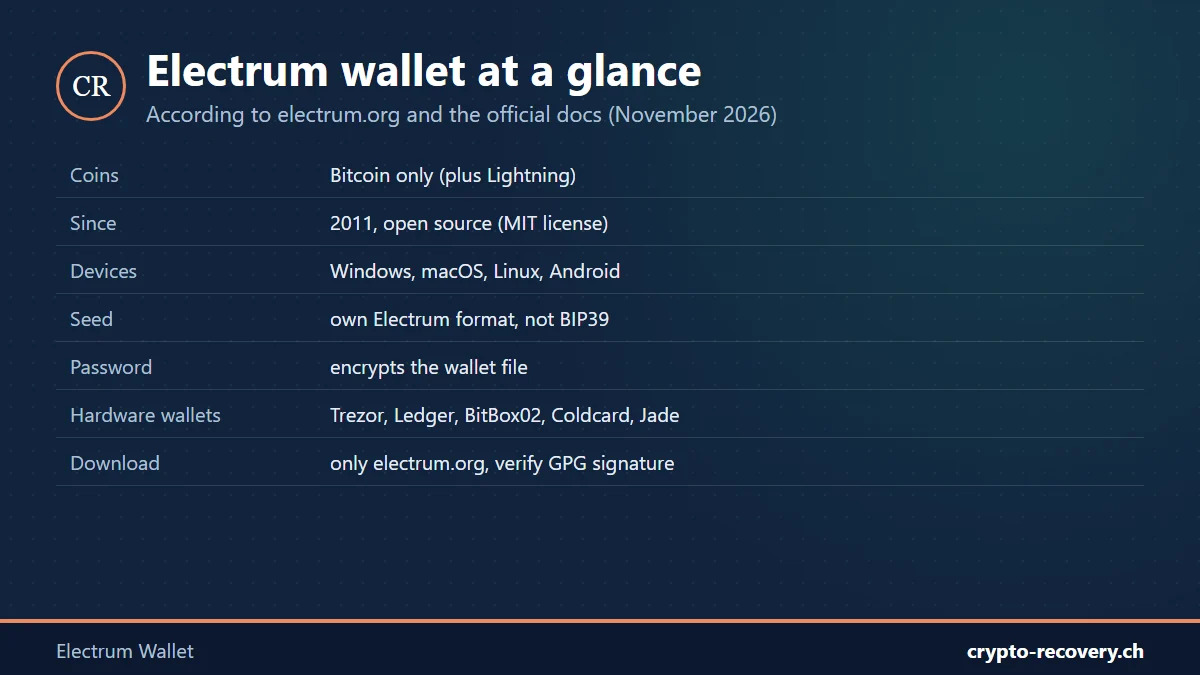
Electrum was created in November 2011 by Thomas Voegtlin. Today it is run by Electrum Technologies GmbH in Berlin. The wallet is open source under the MIT license and, according to the official FAQ, supports only Bitcoin, plus payments over the Lightning Network. Electrum has never supported other coins. Programs such as “Electrum LTC” are separate forks.
Electrum runs on Windows, macOS and Linux, and as an Android app. There is no official iPhone app. The current version is 4.8.4 from November 2026. Electrum works with common hardware wallets, including Trezor, Ledger, BitBox02, Coldcard and Jade.
Electrum download: only from electrum.org
Fake Electrum versions have been a problem for years. Scammers copy the website and buy Google ads. According to Electrum, the official project does not pay for Google ads. If you open a fake version and enter your password, the wallet is drained or the seed is sent to the attackers.
In 2018 there was also a well-known attack through malicious servers: when sending, users saw an error message telling them to install a supposed update, which was actually malware. Electrum closed this hole in early 2019; since then, servers can no longer display their own messages. So download Electrum only from electrum.org and, if in doubt, check the GPG signature as described on the download page. Electrum has no private customer service: anyone contacting you as “Electrum support” is a scammer.
The Electrum seed: why it is not BIP39
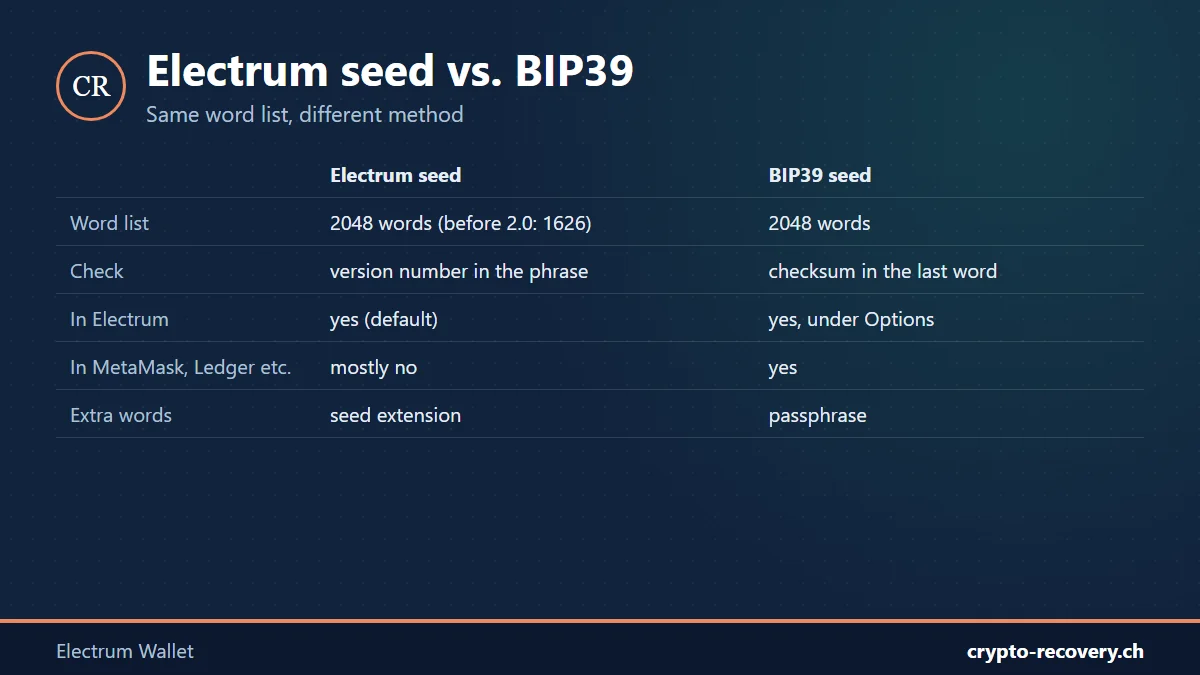
Since version 2.0, Electrum has generated its own seed phrases, usually with 12 words. The words come from the same 2048-word list as BIP39, but Electrum checks and processes them differently. According to the Electrum documentation, the phrase contains a version number that determines which type of wallet it creates, for example standard, SegWit or 2FA.
- Electrum seed in another wallet: most BIP39 wallets, such as MetaMask, Trust Wallet or Ledger Live, reject an Electrum seed or show an empty wallet. A few wallets, such as BlueWallet, explicitly support Electrum seeds. The safest place to restore an Electrum seed is Electrum itself.
- BIP39 seed in Electrum: this works. When restoring, choose “BIP39 seed” under “Options”. Electrum then scans the usual derivation paths automatically.
- Very old seeds (before 2014): Electrum versions before 2.0 used 12 words from a different list of 1626 words. These seeds can still be restored in current versions.
- Seed extension: Electrum offers to “extend this seed with custom words”. This is a passphrase and is not the password of the wallet file. Without this extension, the seed alone will not get you to the coins.
Wallet file and password
Electrum stores each wallet as a file, by default named “default_wallet” in the “wallets” folder. According to the FAQ, the data folder is here:
- Windows: %APPDATA%\Electrum\wallets
- macOS and Linux: ~/.electrum/wallets
The password encrypts the seed and private keys. Since version 2.8, the whole wallet file is encrypted by default. So if you find an old Electrum file on a hard drive, it is often an encrypted file that only opens with the right password, similar to the wallet.dat of Bitcoin Core.
How to restore an Electrum wallet
With the seed you can restore your wallet on any computer; you do not need the old password:
- Install Electrum from electrum.org and open it, or choose “File” → “New/Restore” in the menu.
- Enter a name for the wallet and choose the wallet type, usually “Standard wallet”. For a 2FA wallet, choose the two-factor authentication type.
- Choose “I already have a seed” and enter the words. For a BIP39 seed, select BIP39 under “Options” first.
- If you used a seed extension, enter it too.
- Set a new password. Electrum then syncs the addresses and shows your balance.
If you only have individual private keys instead of a seed, choose the type “Import Bitcoin addresses or private keys”. Lightning funds cannot simply be restored from the seed. Using channel backups, Electrum can only trigger the closing of open channels, and that requires the other side to cooperate.
Electrum problems: the most common cases
Forgot your Electrum password
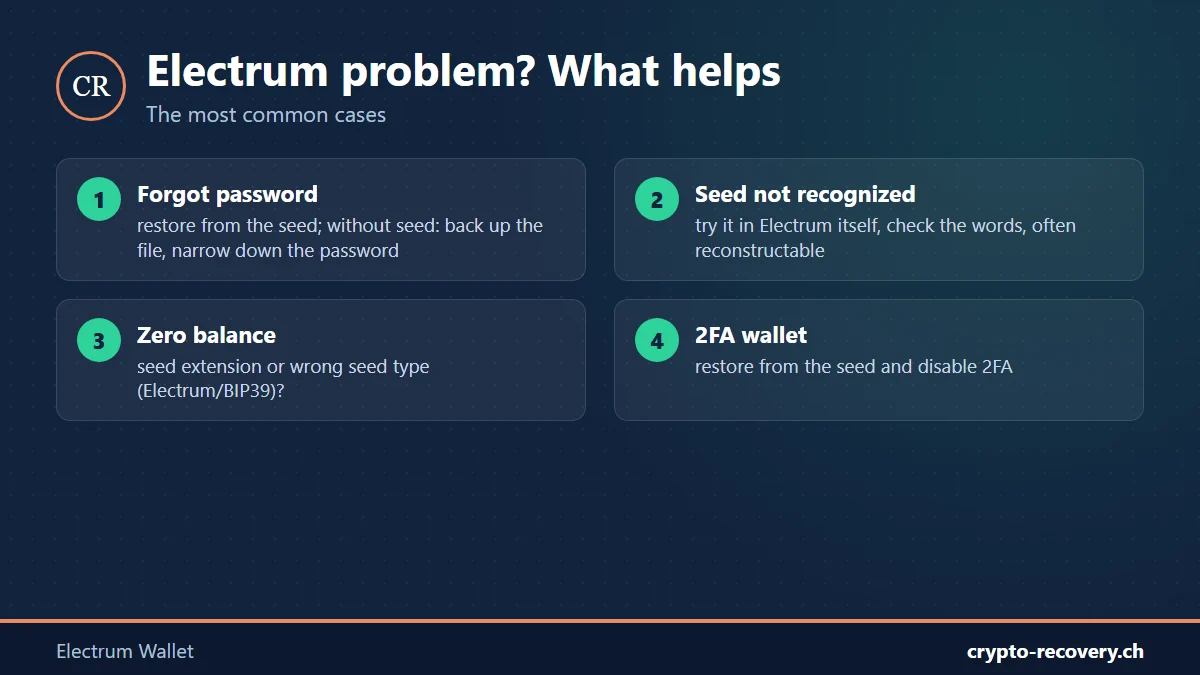
According to the Electrum FAQ, a password cannot be recovered, but you can restore the wallet from the seed and choose a new password. If you no longer have the seed but do have the wallet file, it depends on what you remember: typical passwords, parts, spellings. This lets the search be narrowed down. More in the guide forgot wallet password. Important: never work with the only copy of the file; back it up first.
The seed is not recognized
If another wallet rejects your words, it is often simply an Electrum seed. Try it in Electrum itself. If Electrum rejects the words too, usually a word is written down wrong, missing or in the wrong place. Check each word against the BIP39 word list, or for very old seeds against the old Electrum list. Up to three missing or wrong words are frequently reconstructable.
Zero balance after restoring
Typical reasons: the seed extension is missing, the wrong seed type was chosen when restoring (Electrum or BIP39), or it is a different wallet than expected. Rarely, coins sit on addresses far down the list that Electrum does not scan automatically.
2FA wallet with TrustedCoin
In a two-factor wallet, the TrustedCoin service holds one of three keys. According to Electrum, the coins remain safe as long as you have the seed, even if TrustedCoin is unavailable. When restoring, you can disable two-factor authentication. Two of the three keys are then on your computer, and you can send without TrustedCoin.
Found an old Electrum wallet and cannot get in? Whether it is a forgotten password, an incomplete seed or a missing seed extension: I will check your case for free. You only pay on success, and your data usually stays with you. Request a free initial assessment
Beware of fake Electrum and fake support
On its warning page, Electrum lists not only fake downloads but also programs that swap copied Bitcoin addresses in the clipboard, supposed support agents and planted wallet files with a seeming balance. Never share your seed on a website or with strangers. If your bitcoin was stolen, it cannot be recovered technically. Go to the police, and distrust anyone who promises recovery for an upfront fee.
Related: Storing your seed phrase safely and best hardware wallet comparison.
Frequently asked questions about the Electrum wallet
Is Electrum safe?
Electrum has been in use since 2011, is open source and one of the best-known Bitcoin wallets. The biggest risks are fake versions, malware on the computer and fake support. Download Electrum only from electrum.org and, if in doubt, verify the GPG signature.
Is an Electrum seed a BIP39 seed?
No. Since version 2.0, Electrum has used its own seed format with a version number. The words come from the same list, but most BIP39 wallets do not recognize an Electrum seed. Conversely, Electrum can import BIP39 seeds.
Can Electrum recover my password?
No. According to the Electrum FAQ, a password cannot be recovered. With the seed, however, you can restore the wallet and choose a new password. Without the seed, only the wallet file together with your memory of the password can help.
Where is my Electrum wallet file?
On Windows in %APPDATA% → Electrum → wallets, on macOS and Linux in ~/.electrum/wallets. The default file is called default_wallet. Back up the file before changing anything.
What is the Electrum seed extension?
The seed extension is additional, self-chosen words added to the seed, comparable to a passphrase. It is not the password of the wallet file. Without the extension, the seed leads to a different, empty wallet.
Can I still open an old Electrum wallet from 2013?
Yes, usually. Current Electrum versions can also restore old seeds from before version 2.0, which use 12 words from a list of 1626 words. Old wallet files can be opened with the correct password.
Does Electrum support coins other than Bitcoin?
No. Electrum supports only Bitcoin and payments over Lightning. Programs with similar names for other coins are separate projects and not part of Electrum.
Is there Electrum for iPhone?
There is no official iPhone app. Electrum is available for Windows, macOS, Linux and Android. Avoid apps called Electrum in the App Store.