You enter your passphrase and the wallet is empty? Or you only roughly remember the “25th word” you added to your seed phrase years ago? You’re not alone. The passphrase is one of the most secure features of hardware wallets like Ledger and Trezor, but also one of the trickiest. It doesn’t forgive a single typo, and it never shows an error message.
This guide explains how the passphrase works, which mistakes happen most often, what you should not do now and when a forgotten passphrase can be reconstructed.
Key points
- The passphrase is a self-chosen extra password on top of your seed phrase. Every passphrase opens its own wallet.
- A wrong passphrase doesn’t trigger an error, it opens a different, empty wallet. Your funds are not gone.
- Neither Ledger nor Trezor stores the passphrase. No manufacturer can recover it.
- Careful with Ledger: three wrong PIN entries reset the device. Don’t guess a PIN.
- With what you remember about the passphrase, the possibilities can be narrowed down in a targeted way.
What is the passphrase, the “25th word”?
Your seed phrase of 12 or 24 words is the backup of your wallet. Many wallets also allow an optional passphrase. It’s often called the “25th word”, even though it doesn’t have to be a word from the list. You can choose anything, such as a sentence, a number sequence or a password with special characters.
Technically, the passphrase is combined with the seed phrase according to the BIP39 standard. The result is a completely different wallet with its own addresses. The normal wallet without a passphrase still exists alongside it. Anyone who finds your seed phrase therefore only sees the wallet without a passphrase, not the protected one. That’s what makes the feature so secure. More about the seed phrase itself in our guide to the seed phrase.
The passphrase is available on Ledger and Trezor, on many other hardware wallets and also on software wallets like Electrum, where you can extend the seed with custom words.
The tricky part: there is no wrong passphrase
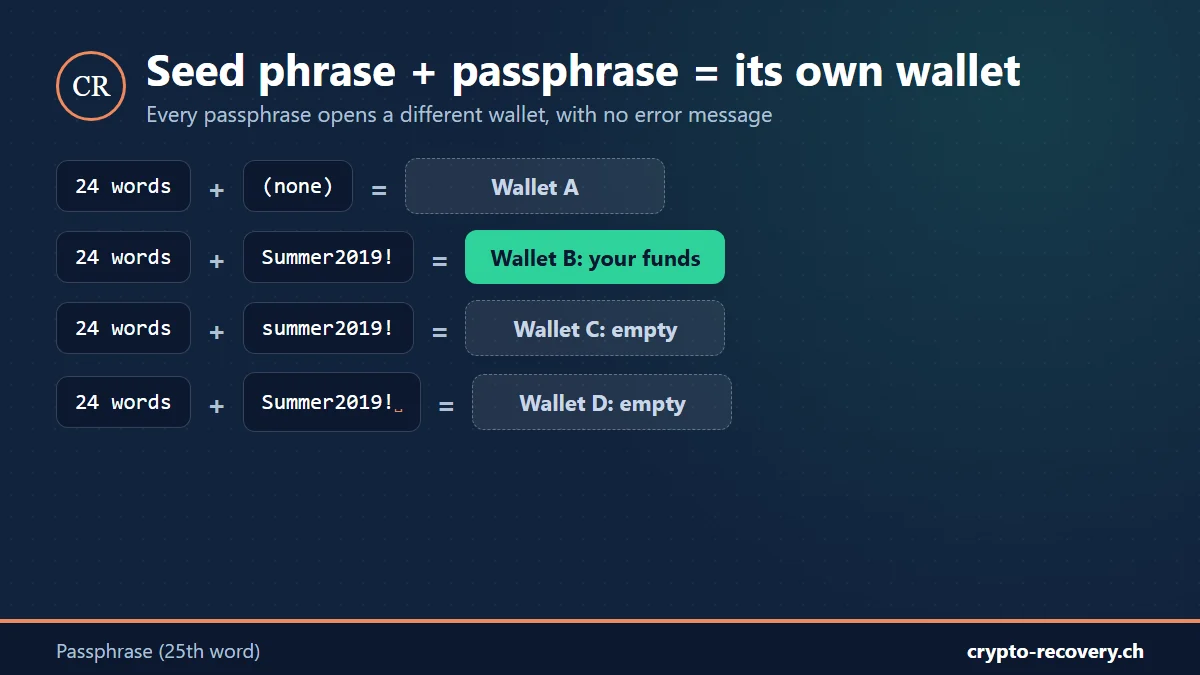
With a password, the system tells you whether it’s correct. With a passphrase it doesn’t. According to the BIP39 standard, every passphrase is valid and creates its own wallet. If you mistype a single letter, you don’t get an error message, you get a new, empty wallet.
Many people believe at that moment that their money was stolen. Usually it wasn’t. The coins are still in the wallet that belongs to the correct passphrase. You’re just looking at a different one.
Passphrase on Ledger
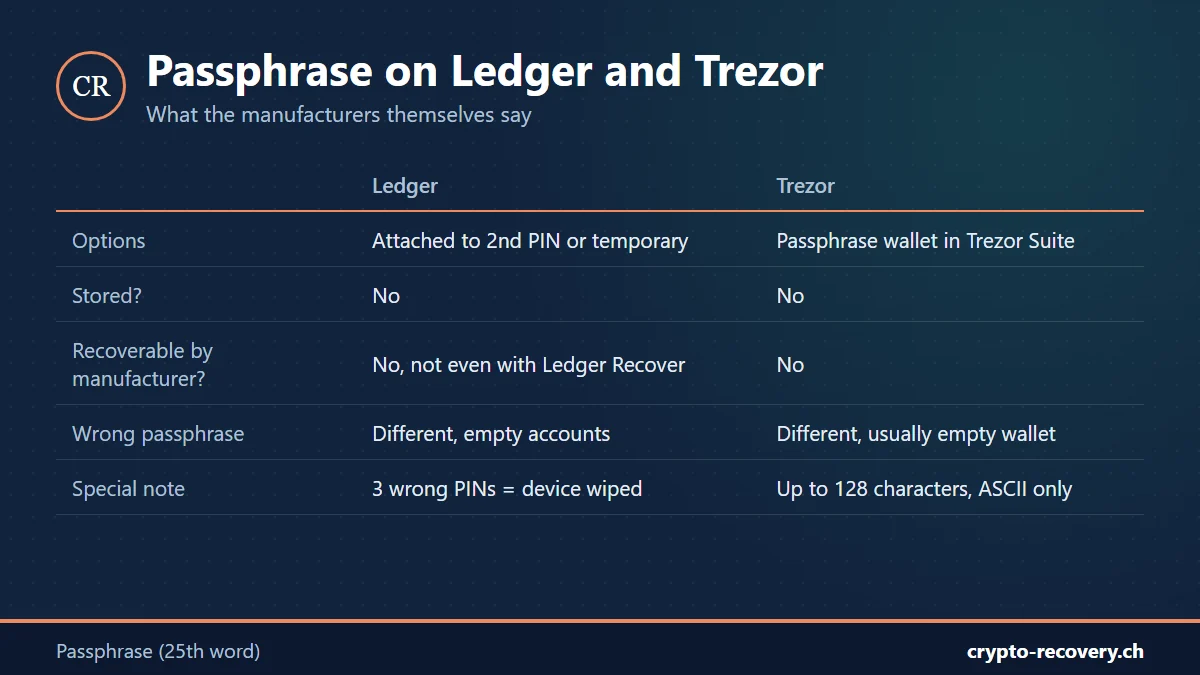
Ledger offers two options:
- Attached to a second PIN: you unlock the passphrase accounts with their own PIN. The passphrase itself isn’t stored, only the keys derived from it in the secure chip.
- Temporary: the passphrase has to be entered again in every session.
In both cases, according to Ledger, the passphrase is never stored on the device and can’t be verified there. The subscription service Ledger Recover has no access to it either.
Very important: if you enter a wrong PIN three times, whether the normal PIN or the passphrase PIN, the Ledger resets itself. Seed phrase and passphrase are then deleted from the device. If you’ve forgotten the passphrase PIN, don’t guess. You can always set the wallet up again with the seed phrase and the right passphrase, but the passphrase is exactly what you’re missing.
Passphrase on Trezor
On Trezor you open a passphrase wallet in the Trezor Suite app and enter the passphrase on the device or on the computer. According to Trezor:
- The passphrase is case-sensitive.
- Up to 128 characters are allowed (Model T and Safe models) or 50 characters (Model One), ASCII characters only.
- The passphrase isn’t stored and can’t be changed or recovered by Trezor.
- A mistyped passphrase opens a different, usually empty wallet. That doesn’t mean your funds are gone.
Your passphrase wallet shows 0? Tell me what you still remember. I’ll check for free whether the passphrase can be narrowed down. Request a free assessment
The most common passphrase mistakes
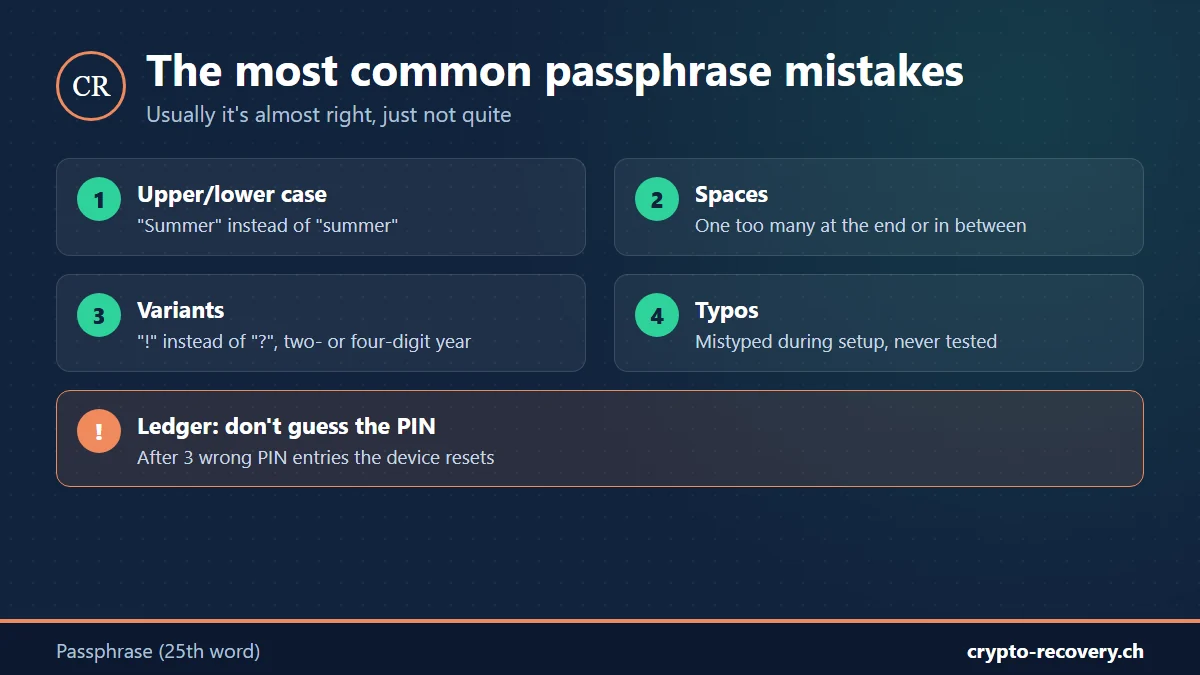
In practice, a passphrase is rarely forgotten completely. Usually it’s almost right, just not quite. Typical cases:
- Upper and lower case: “Summer2019” instead of “summer2019” gives a completely different wallet.
- Spaces: one space too many at the end, between two words, or one too few.
- Variants of the same idea: with or without special characters, “!” instead of “?”, a two- or four-digit year.
- Swapped digits and typos: mistyped during setup and never tested.
- Mix-ups: passphrase confused with the PIN or another password, or the passphrase belongs to a different seed phrase.
What you should do now and what not
- Write down what you remember while it’s fresh: parts, typical spellings, numbers, special characters, your usual password habits, the rough date of setup.
- Find an address of the passphrase wallet, for example from an old exchange withdrawal or a transaction. It lets you tell for certain later whether a passphrase is correct.
- Don’t guess a PIN and don’t reset the device.
- Never enter your seed phrase and passphrase on websites or online tools and never send them to so-called helpers. Anyone who knows both can empty your wallet immediately.
When a forgotten passphrase can be reconstructed
Without the seed phrase, nothing works. But if you have the seed phrase and only remember parts of the passphrase, we use your memories to narrow down the possibilities in a targeted way. The possible variants are then checked systematically.
The more clues there are, the better the chances. Someone who still knows “it was my dog’s name with a year and a special character” has far better chances than someone with no clue at all. A completely random passphrase with no memory of it, on the other hand, can’t be found again. That’s exactly what the feature was built for.
How a recovery works at Crypto Recovery
- Free initial assessment: you describe your case and what you still know about the passphrase. You don’t send the seed phrase or the passphrase.
- Approach and chances: together we work out how realistic a reconstruction is.
- Recovery via Zoom or in person in Perg, Austria: you carry out the steps on your own device under guidance and stay in control. Remote control software is never used.
- You only pay on success: no upfront payment. The invoice only comes after a successful recovery.
How we handle your secret data is described on the security and process page.
You only remember parts of your passphrase? That’s exactly when a check is worth it. No success, no fee. Free assessment
Frequently asked questions about the passphrase
What is a passphrase on a crypto wallet?
A self-chosen extra password on top of the seed phrase, often called the “25th word”. Together with the seed phrase it creates its own hidden wallet. Anyone who only knows the seed phrase can’t see that wallet.
I forgot the passphrase for my Ledger. What should I do?
Don’t guess the PIN, because the device resets after three wrong attempts. Ledger doesn’t store the passphrase and can’t recover it. Write down what you remember. With the seed phrase and your memories, the possibilities can be narrowed down in a targeted way.
Why is my wallet empty after entering the passphrase?
Because every passphrase opens its own wallet. A single typo, a space or a capital letter leads to a different, empty wallet. The funds are still in the wallet with the correct passphrase.
Can Trezor or Ledger recover my passphrase?
No. Neither manufacturer stores the passphrase or has access to it, not even via Ledger Recover.
Can a forgotten passphrase be found again?
If you have the seed phrase and remember parts of the passphrase, often yes. Your memories are used to narrow down the possible variants, which are then checked systematically. A completely random passphrase with no clue can’t be found again.
Is the passphrase the same as the PIN?
No. The PIN only unlocks the device. The passphrase determines which wallet is derived from your seed phrase. On Ledger, a passphrase can also be attached to a second PIN.